1. How many admin users can be added in the extension?
Ans - Any number of Admin Users can be added in the extension.
2. Can multiple attributes be assigned to a single Admin user?
Ans - No, single admin can be assigned a single attribute only.
3. Can I set multiple attributes at a time to split the order?
Ans - No, the order cannot be split with multiple attributes.
4. Can I set two conditions together to split the order?
Ans - Currently, this option is not available however we can achieve this with customization.
5. If an attribute is not assigned how will the extension work?
Ans - It will work according to default functionality.
6. Is this extension compatible with a bundle or grouped products?
Ans - Currently, the extension is not compatible with a bundle or grouped products. However, we can achieve this through customization.
7. Does the user make a one-time payment or is it multiple payments for the different order created?
Ans - There is only one payment taken for all the items in the cart, once the order is placed it split into different IDs.
8. Is this extension compatible with Magento Enterprise 2.4?
Ans - Yes, our extension is compatible with both Magento Community 2.4 and Enterprise 2.4 Edition.
9. How are the payments for the order created in the extension taken?
Ans - It does not affect any payment process, works similar to the default configuration.
10. Is it compatible with all payment gateways? Like Paypal, Stripe?
Ans - Yes, Our extension is compatible with all onsite and offsite payment gateways.
11. How is the payment handled when we connect with a Payment Service Provider.
Ans - The payment is being taken before the order is split so the complete order amount is taken from the pay.
12. Will the customer pay multiple times?
Ans - Payment will be made only once for complete order amount, later the order splits as per the items in cart.
13. Difference between Split Order on Checkout and Advanced Split Order on Checkout?
Ans - The basic difference between Split Order on Checkout and Advanced Split Order on Checkout is that the Split Order on Checkout extension split an order automatically into multiple orders based on the product’s attribute or the number of items added into the cart. The customer will receive different order ids for their ordered cart.
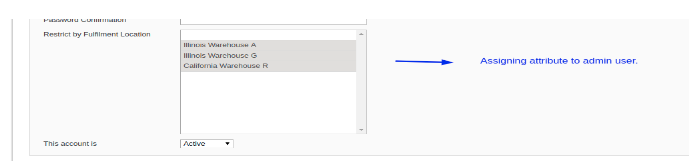
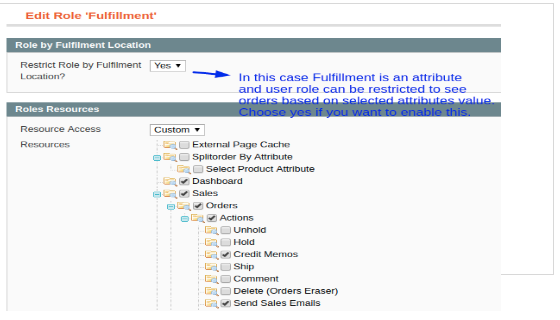
Whereas in Advanced Split order on Checkout along with the above functionality admin can create various Admin Users and restrict their roles based on the assigned attribute option, admin user whose role is restricted based on certain attribute option will only see the orders related to the attributes assigned to him only. These admin users can then also filter these results based on the attributes assigned to them through a dynamic filter provided in our custom column of ‘Split Attribute’.
14. Does this extension help to manage each item invoice manage separately?
Ans - Yes, When the order split as per the items in the cart, at the backend each split order’s invoices, credit memo, etc can be managed easily.
15. What is the difference between Split Order On Checkout/Split Order On Checkout Pro and Advanced Split Order On Checkout?
Ans - Split Order on Checkout extension simply splits the order into different ids according to the number of items in the order.
Split Order On Checkout Pro extension splits the order into different ids according to conditions set as per the assigned attribute at the backend.
Advanced Split Order On Checkout extension splits the order into different ID’s according to assigned attribute as per different conditions. This extension also enables to create various admin users with restricted roles.

Reviews
There are no reviews yet.