1.Which tab ensure that the extension is completely installed and ready to be used.?
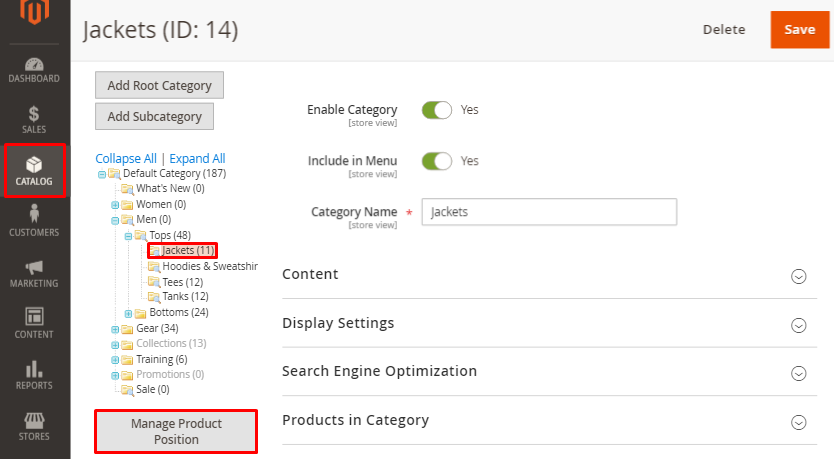
Ans - Under the categories and subcategories list, there will be a tab Manage Product Position. This tab ensure that the extension is completely installed and ready to be used.
2. Where you can find Manage Product Position?
Ans - You can find manage product position at Under the categories and subcategories list.
3.Is this extension compatible with Magento Community and Enterprise 2.3?
Ans - Yes, our extension is compatible with both Magento Community 2.3 and Enterprise 2.3 Edition.
4.What is the main feature of this extension?
Ans - 1. The Drag And Drop Product Sorter” is great in scenarios when there is a need to manage the sequence of the products on the front-end.
2. It saves a lot of the admin’s time, which could have been wasted in the tiresome job of fixing the arrangement of items on the front-end.
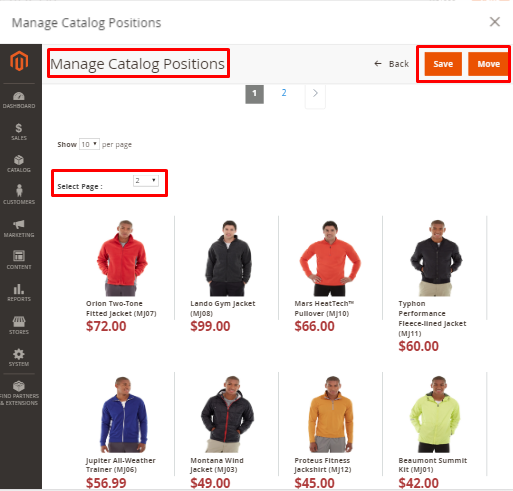
3.Simply pick the required product, choose a desired location for the product, drag the product to the desired location and drop it.
4.The best feature of this version is that it not only allows the admin to change the position of the catalog product on a single page rather the products can be moved to a new or different category page.
Example:
Let suppose in store there is a category called Tops and under that a subcategory called Jackets. You want to change the order/layout of the products in the Jackets category on the front end.
To do so, select the category Jackets and then click on the Manage Product Position tab, a pop-up window Manage Catalog Positions open with the products of the selected category will be available for drag and drop.
Reviews
There are no reviews yet.